Your EDS storefront needs three things on one product page. The product data lives in ACCS. The real warehouse stock lives in the ERP. The rich copy and spec sheet live in the PIM. On PaaS, you’d write a PHP GraphQL resolver that calls the ERP and be done. On ACCS, you can’t. That’s exactly the gap API Mesh in ACCS fills: one GraphQL endpoint that stitches Commerce and your back-office systems together, without touching Commerce code.
This post continues my ACCS series. In App Builder for ACCS, I built a first action. In ACCS Webhooks vs Events, I covered how Commerce pushes data out. This time, the data flows the other way: the storefront pulls from many systems at once.
The facts here come from Adobe’s API Mesh docs and the Storefront Services GraphQL docs. The commands and config keys are taken from those pages. The ERP and PIM endpoints are made up, so treat the example as a template and test it in a Stage workspace first.
What API Mesh is, and why it matters more on ACCS
API Mesh for Adobe Developer App Builder is a managed GraphQL gateway. You describe your sources in a JSON file, deploy it with the aio CLI, and Adobe hosts the result on its edge network. You don’t write a server. You write a mesh.json.
Each source is a GraphQL API, an OpenAPI REST API or a plain REST endpoint described with JSON schemas. The mesh merges them into one schema. Then you can extend that schema with new fields that pull data from another source. So a product from Commerce can carry an erp_stock field that really comes from your ERP.
Why does this matter more on ACCS than on PaaS? Three reasons.
- You can’t extend Commerce GraphQL in PHP. No custom
schema.graphqls, no resolver classes. I covered that in ACCS vs PaaS custom modules. Mesh is now the place where schema extension happens. - Catalog data comes from Storefront Services. As I explained in Catalog Service and Live Search in ACCS, product reads go to Catalog Service and Live Search. On ACCS, they share one endpoint with core GraphQL. That makes the Commerce side of the mesh simpler than on PaaS.
- It’s in the box. Adobe says API Mesh is part of App Builder, which requires an active Commerce license (PaaS, ACCS or Adobe Commerce Optimizer). ACCS licensing includes App Builder packs, so most projects already have access. Confirm your entitlements with Adobe, though.
Architecture: where the mesh sits
Here’s the request path for the example we’ll build.
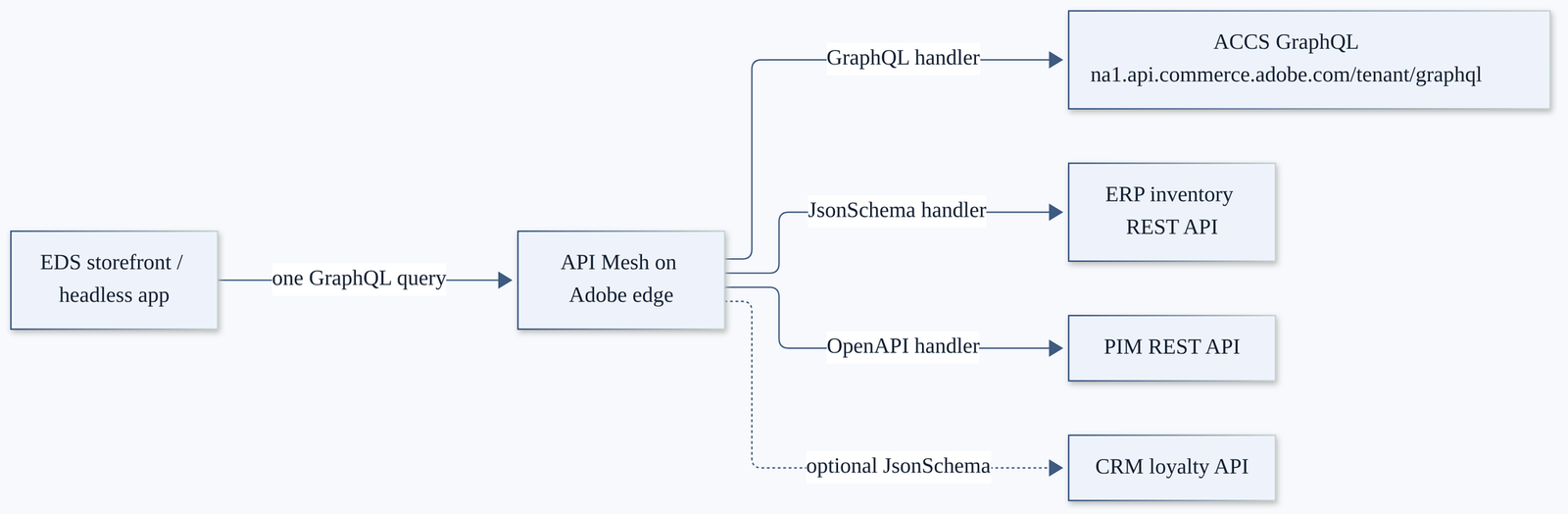
And here’s what each layer does.
| Layer | What it does | Who runs it |
|---|---|---|
| Storefront | Sends one query to the mesh URL | You |
| API Mesh | Merges schemas, runs resolvers and hooks, caches, applies WAF and DDoS protection | Adobe hosts it; you own mesh.json |
| ACCS GraphQL | Core Commerce plus Catalog Service and Live Search | Adobe |
| ERP, PIM, CRM | Your systems of record, exposed over HTTPS | You or the vendor |
Two things to keep in mind. First, the mesh is read-mostly glue. It isn’t a queue, and it doesn’t store data. Second, the mesh has a 60-second timeout on every request. If a back-office call is slow, the shopper waits.
How it differs from PaaS
If you’ve built meshes on PaaS before, most of the knowledge carries over. These are the differences I’d watch.
| Topic | PaaS (Adobe Commerce on Cloud) | ACCS |
|---|---|---|
| Commerce GraphQL endpoint | https://<your-site>/graphql | https://<region>.api.commerce.adobe.com/<tenant-id>/graphql (sandboxes use <region>-sandbox) |
| Catalog Service | Separate endpoint (catalog-service.adobe.io), usually a separate source with a prefix transform | Same endpoint as core GraphQL |
X-Api-Key header | Your real Storefront Services API key | Adobe’s ACCS example sets it to not_used |
| Extending the schema | PHP resolvers or the mesh | The mesh only |
| Calling Commerce REST from the mesh | Integration tokens were common | IMS OAuth server-to-server token, with the commerce.accs scope |
That last row matters if your mesh calls ACCS REST APIs. Adobe documents a SaaS REST example that gets an IMS token in a hook and caches it in context state. For storefront reads, the GraphQL handler is enough.
Prerequisites
- An App Builder project in the Adobe Developer Console, with a Stage workspace. I set this up in the App Builder post.
- The API Mesh for Adobe Developer App Builder API added to that workspace (Add Service > API, filter by Adobe Experience Platform).
- Node.js and the aio CLI with the mesh plugin.
- Your ACCS tenant ID, store codes and customer group ID.
- HTTPS endpoints for the ERP and PIM, plus their credentials.
npm install -g @adobe/aio-cli
aio plugins:install @adobe/aio-cli-plugin-api-mesh
aio login
One rule worth knowing early: each workspace can hold only one mesh. So use separate workspaces for Stage and Production.
Step by step: Commerce + ERP inventory + PIM
The goal is one query that returns a product from ACCS, its live warehouse stock from the ERP and enriched content from the PIM.
1. Set up the folder
Every referenced file must sit in the same folder as mesh.json, with a path under 25 characters. When you create or update the mesh, the CLI inlines those files into a files array for you.
accs-mesh/
├── mesh.json
├── .env              # build-time variables (never commit)
├── secrets.yaml      # runtime secrets (never commit)
├── erp-stock.json    # JSON schema for the ERP response
├── pim-openapi.json  # trimmed OpenAPI spec for the PIM
└── resolvers.js      # programmatic resolver
2. Keep config and secrets apart
The mesh supports two mechanisms, and they behave differently.
.env values are inserted when the mesh is built, using {{env.NAME}}. Use them for things like URLs that change per environment.
ACCS_GRAPHQL_URL='https://na1-sandbox.api.commerce.adobe.com/<tenant-id>/graphql'
TENANT_ID='<tenant-id>'
ERP_BASE_URL='https://erp.example.com/api/v2'
Secrets are encrypted and read at runtime with {context.secrets.NAME}. You can use them in operation headers and in JavaScript resolvers and hooks. Adobe allows up to 50 secrets per mesh, at 5 KB each.
ERP_TOKEN: $ERP_TOKEN
PIM_API_KEY: $PIM_API_KEY
3. Write mesh.json
Here’s the full configuration. I’ll walk through each part below.
{
  "meshConfig": {
    "sources": [
      {
        "name": "ACCS",
        "handler": {
          "graphql": {
            "endpoint": "{{env.ACCS_GRAPHQL_URL}}",
            "operationHeaders": {
              "Content-Type": "application/json",
              "Magento-Environment-Id": "{{env.TENANT_ID}}",
              "Magento-Website-Code": "base",
              "Magento-Store-Code": "main_website_store",
              "Magento-Store-View-Code": "default",
              "Magento-Customer-Group": "{context.headers['magento-customer-group']}",
              "X-Api-Key": "not_used"
            },
            "schemaHeaders": {
              "Magento-Environment-Id": "{{env.TENANT_ID}}",
              "x-api-key": "not_used"
            }
          }
        },
        "responseConfig": {
          "cache": { "cacheControl": "public, max-age=600" }
        }
      },
      {
        "name": "ErpInventory",
        "handler": {
          "JsonSchema": {
            "baseUrl": "{{env.ERP_BASE_URL}}",
            "operationHeaders": {
              "Authorization": "Bearer {context.secrets.ERP_TOKEN}"
            },
            "operations": [
              {
                "type": "Query",
                "field": "erp_stock",
                "path": "/inventory?sku={args.sku}",
                "method": "GET",
                "responseSchema": "./erp-stock.json"
              }
            ]
          }
        }
      },
      {
        "name": "Pim",
        "handler": {
          "openapi": {
            "source": "./pim-openapi.json",
            "operationHeaders": {
              "x-api-key": "{context.secrets.PIM_API_KEY}"
            }
          }
        },
        "transforms": [
          { "prefix": { "includeRootOperations": true, "includeTypes": false, "value": "pim_" } }
        ]
      }
    ],
    "additionalTypeDefs": "extend type SimpleProductView { erp_stock: ErpStockLevel pim: PimProduct } type ErpStockLevel { sku: String qty: Float warehouse: String next_restock: String }",
    "additionalResolvers": [
      {
        "targetTypeName": "SimpleProductView",
        "targetFieldName": "pim",
        "requiredSelectionSet": "{ sku }",
        "sourceName": "Pim",
        "sourceTypeName": "Query",
        "sourceFieldName": "pim_getPimProduct",
        "sourceArgs": { "sku": "{root.sku}" }
      },
      "./resolvers.js"
    ],
    "responseConfig": {
      "includeHTTPDetails": false,
      "cache": true,
      "CORS": {
        "origin": ["https://www.example.com"],
        "methods": ["GET", "POST"],
        "maxAge": 60480
      }
    }
  }
}
The ACCS source uses the graphql handler with the headers from Adobe’s ACCS best-practices example. Note the customer group header. It’s read from the incoming request with {context.headers['...']}, so B2B or member pricing can flow through. Header names in context are lowercase.
The ERP source uses the JsonSchema handler. That’s the right pick when the ERP has no OpenAPI spec. You describe each operation by hand. {args.sku} in the path turns into a GraphQL argument automatically. The responseSchema must be a local file. Here’s a minimal erp-stock.json:
{
  "$schema": "http://json-schema.org/draft-07/schema#",
  "title": "ErpStock",
  "type": "object",
  "properties": {
    "sku": { "type": "string" },
    "qty": { "type": "number" },
    "warehouse": { "type": "string" },
    "next_restock": { "type": "string" }
  }
}
The PIM source uses the openapi handler with a trimmed spec. The handler builds query fields from each operationId, so an operation named getPimProduct becomes getPimProduct, and the prefix transform turns it into pim_getPimProduct. I set includeTypes: false because the spec names its schema PimProduct, which won’t clash. If your PIM’s types are generic, like Product, prefix the types too.
4. Link the PIM with a declarative resolver
The object in additionalResolvers is a declarative resolver. It reads like this: when someone asks for pim on a SimpleProductView, fetch the sku first, then call pim_getPimProduct(sku: <that sku>) on the PIM source.
Why SimpleProductView? On ACCS, product reads go through Catalog Service. Its products query returns SimpleProductView and ComplexProductView, not the old SimpleProduct and ConfigurableProduct types. Extend ComplexProductView the same way if you sell configurable products.
5. Add ERP stock with a programmatic resolver
Declarative resolvers are great for straight mapping. As soon as you need logic, like a fallback when the ERP is down, switch to JavaScript. Here’s resolvers.js:
module.exports = {
  resolvers: {
    SimpleProductView: {
      erp_stock: {
        selectionSet: '{ sku }',
        resolve: async (root, args, context, info) => {
          try {
            const stock = await context.ErpInventory.Query.erp_stock({
              root,
              args: { sku: root.sku },
              context,
              info,
              selectionSet: '{ sku qty warehouse next_restock }'
            })
            return stock || null
          } catch (e) {
            // Don't fail the whole product page because the ERP is slow
            context.logger.error(`ERP stock lookup failed for ${root.sku}`)
            return null
          }
        }
      }
    }
  }
}
The pattern comes from Adobe’s programmatic resolver docs. context.<SourceName>.Query.<field> calls another source through the mesh, so headers and secrets still apply. You can also call globalThis.fetch directly, and context.secrets is available in resolvers if you need a token there.
Returning null on failure is a deliberate choice. A missing stock badge is a lot better than a blank product page.
6. Query it
query ProductWithBackOffice {
  products(skus: ["MJ01"]) {
    sku
    name
    ... on SimpleProductView {
      erp_stock { qty warehouse next_restock }
      pim { marketingCopy specSheetUrl }
    }
  }
}
The pim fields depend on your PIM spec, so marketingCopy and specSheetUrl are placeholders. Open the playground in the Developer Console and check the real names with the Documentation Explorer.
Where the CRM fits
CRM data is the tricky one, because it’s usually personal. A loyalty tier or points balance belongs to one shopper. You can add a CRM as another JsonSchema source and pass the shopper’s token through with {context.headers['authorization']}. However, keep that response out of the cache. Adobe’s caching is source-driven, and it never caches responses marked private or no-store. Make sure your CRM sends one of those.
Writing to the CRM is a different story. New customers, consent changes and order history belong in events, as I described in the webhooks vs events post. Don’t turn the mesh into a sync engine.
Deploy, update and debug
Create and check
aio api-mesh:create mesh.json --env .env --secrets secrets.yaml
aio api-mesh:status
aio api-mesh:describe
Provisioning takes a few minutes. status tells you when the build has finished. describe prints the mesh ID and the endpoint, which looks like https://edge-graph.adobe.io/api/<mesh-id>/graphql.
Update
aio api-mesh:update mesh.json --env .env --secrets secrets.yaml
aio api-mesh:cache:purge -a -c
Only run create once per workspace. After that, it’s always update. Purge the cache whenever a change could affect cached responses.
Run it locally first
Each remote build takes minutes, so iterate locally.
aio api-mesh:init accs-mesh
aio api-mesh:run mesh.json --secrets secrets.yaml -p 5000
The local server runs at http://localhost:5000/graphql. Add --debug to attach the VS Code debugger to your resolvers. Locally, I’d also flip includeHTTPDetails to true. It shows each source call and its response time, which is how you spot an N+1 problem.
Read the logs
aio api-mesh:get --active mesh-active.json
aio api-mesh:log-list
aio api-mesh:log-get <rayId>
aio api-mesh:log-get-bulk --past 30 --filename mesh_logs.csv
log-list shows the 15 most recent requests by ray ID. log-get gives you the logs for one of them, including your context.logger output. For tracing across systems, send your own x-request-id header. The mesh passes it on to every source call.
Security and performance
Security
Adobe runs DDoS protection and a WAF in front of every mesh. The rest is yours.
- Authentication. The mesh has no built-in auth. It forwards your sources’ auth headers. If the mesh exposes anything sensitive, add a
beforeAllhook that checks a token, like Adobe’s secrets example. - Introspection. Set
"disableIntrospection": truein production. - Query limits. The newer
queryConfigobject addsmaxDepth,maxAliases,maxTokens,costLimit,blockFieldSuggestionandmaskErrors. All of them are off by default, so turn them on deliberately. - CORS. List your storefront origins under
responseConfig.CORS. Don’t use a wildcard in production. - HTTP details. Keep
includeHTTPDetailsset tofalseoutside local development. It can leak headers.
"disableIntrospection": true,
"queryConfig": {
  "maxDepth": { "enabled": true, "limit": 6 },
  "maxAliases": { "enabled": true, "limit": 10 },
  "blockFieldSuggestion": { "enabled": true },
  "maskErrors": { "enabled": true, "message": "Unexpected error." }
}
Rate limits
Adobe applies rate limiting but doesn’t publish exact numbers on the security page. If you see repeated 429 responses, Adobe’s advice is to contact API Mesh support. Your ERP probably has stricter limits than the mesh, so caching and batching protect it as much as they protect the shopper.
Performance
- Turn on native caching. It’s off until you set
responseConfig.cache: true. Only successful, error-free query responses with publiccache-controlheaders are cached. - Vary the cache by customer group. Send
x-api-mesh-vary: magento-customer-groupso each group gets its own cache entry and nobody sees another group’s prices. - Batch ERP calls. A category page with 24 products means 24 ERP calls. If your ERP accepts a list of SKUs, use
keysArgandkeyFieldin a declarative resolver to send one request. - Mind cold starts. Meshes run in more than 330 edge locations. Use
Connection: keep-alivein clients that support it, and warm the mesh before load testing.
Gotchas I’d plan for
- `JsonSchema`, not `jsonSchema`. The handler key is capitalised differently from the others, and camel case fails.
- Source names. Adobe’s docs say source handler names should be alphanumeric. Interestingly, Adobe’s own ACCS example uses underscores. I’d stick to plain names like
ACCS. - Secrets vanish on update. If you run
updatewithout--secrets, the secret values are replaced by their literal references. Put the flag in your CI script. - Schema changes need an update. When the ERP or PIM changes its contract, run
aio api-mesh:update, or the mesh keeps using the old schema. - No `responseConfig` on JsonSchema. You can’t forward headers or set cache defaults on that handler. Set
cache-controlon the ERP itself. - Size limits. A mesh config is capped at 375 KB, or 750 KB with a
filesarray. Trim your OpenAPI spec to the operations you use. - GET length. Cached GET requests are limited to 2,048 characters. Long queries should go over POST, which native caching also supports.
- Hook timeouts. Local hook functions time out after 30 seconds, and the whole request after 60.
- The CLI breaks. If you see
HandlerCtor is not a constructor, Adobe’s fix is to uninstall and reinstall the mesh plugin.
Decision table: Mesh, App Builder action or webhooks and events?
| Use case | Pick | Why |
|---|---|---|
| Show ERP stock on PDP and PLP | API Mesh | Read-time join, cacheable, no Commerce change |
| Add PIM content to product queries | API Mesh | Declarative resolver, no code to host |
| Hide or rename fields for a mobile app | API Mesh | filterSchema and rename transforms |
| Show a shopper’s loyalty tier | API Mesh, uncached | Read-only, per-user, passes the shopper’s token |
| Complex logic or long-running calls behind a field | App Builder action, called from the mesh | Runtime gives you more time and full Node.js |
| Validate stock before add-to-cart | Webhook | Must block the Commerce flow |
| Send orders to the ERP | Event | Async, retried, replayable |
| Sync product changes into a PIM or search | Event | High volume, tolerant of delay |
| Nightly bulk import from the PIM | App Builder action on a schedule | Batch job, not a request-time concern |
My rule of thumb: if the storefront needs to *read* combined data now, use the mesh. If Commerce needs to *decide* something now, use a webhook. If a system needs to *know* something happened, use an event.
Checklist
- ☐ API Mesh service added to the Stage workspace.
- ☐ ACCS endpoint, tenant ID and store headers confirmed.
- ☐
.envandsecrets.yamlin.gitignore. - ☐ Product types checked in the playground (
SimpleProductView,ComplexProductView). - ☐ Resolvers return
nullinstead of failing the whole query. - ☐ Caching on, with customer-group variance.
- ☐ Personal data sources send
privateorno-store. - ☐ Introspection off and
queryConfiglimits on in production. - ☐
--secretsflag in every update command and CI job. - ☐ Production mesh in its own workspace.
FAQ
Is API Mesh included with ACCS?
API Mesh is part of App Builder, and ACCS licensing includes App Builder packs. Exact entitlements depend on your contract, so check with Adobe.
Do I still need a separate Catalog Service source on ACCS?
Usually not. On ACCS, Catalog Service and Live Search share the tenant GraphQL endpoint with core Commerce. On PaaS, they’re separate, which is why older examples add a second source with a catalog_ prefix.
Can the mesh write data, like creating an ERP order?
It can proxy mutations, and Adobe has chain mutation samples. Still, I’d send order data through events so you get retries and a journal. A mesh call that fails mid-checkout has no safety net.
Can my EDS storefront use the mesh instead of the ACCS endpoint?
Yes, in principle. The drop-ins only need a GraphQL endpoint. Just keep the mesh schema compatible with what the drop-ins query, and test cart and checkout carefully. I haven’t verified every drop-in against a mesh, so treat this as something to prove in Stage.
Where do I see my mesh in the UI?
Open the workspace in the Adobe Developer Console and select API Mesh. You’ll find the active config, a GraphQL playground and the deployment history with downloadable error logs.
My take
API Mesh is the piece of ACCS that made me stop missing custom GraphQL resolvers. Most of what I used to write in PHP was really “fetch this from another system and attach it to the product”. A few lines of mesh.json now do that, at the edge, with caching.
The catch is discipline. A mesh makes it very easy to put a slow ERP on your critical path, so cache aggressively, batch where you can and always fail soft. If you’re still mapping your PaaS build, start with my PaaS to ACCS migration checklist, and see ACCS vs Adobe Commerce on Cloud for the bigger picture. And if a step here doesn’t match what you see in your tenant, tell me in the comments.