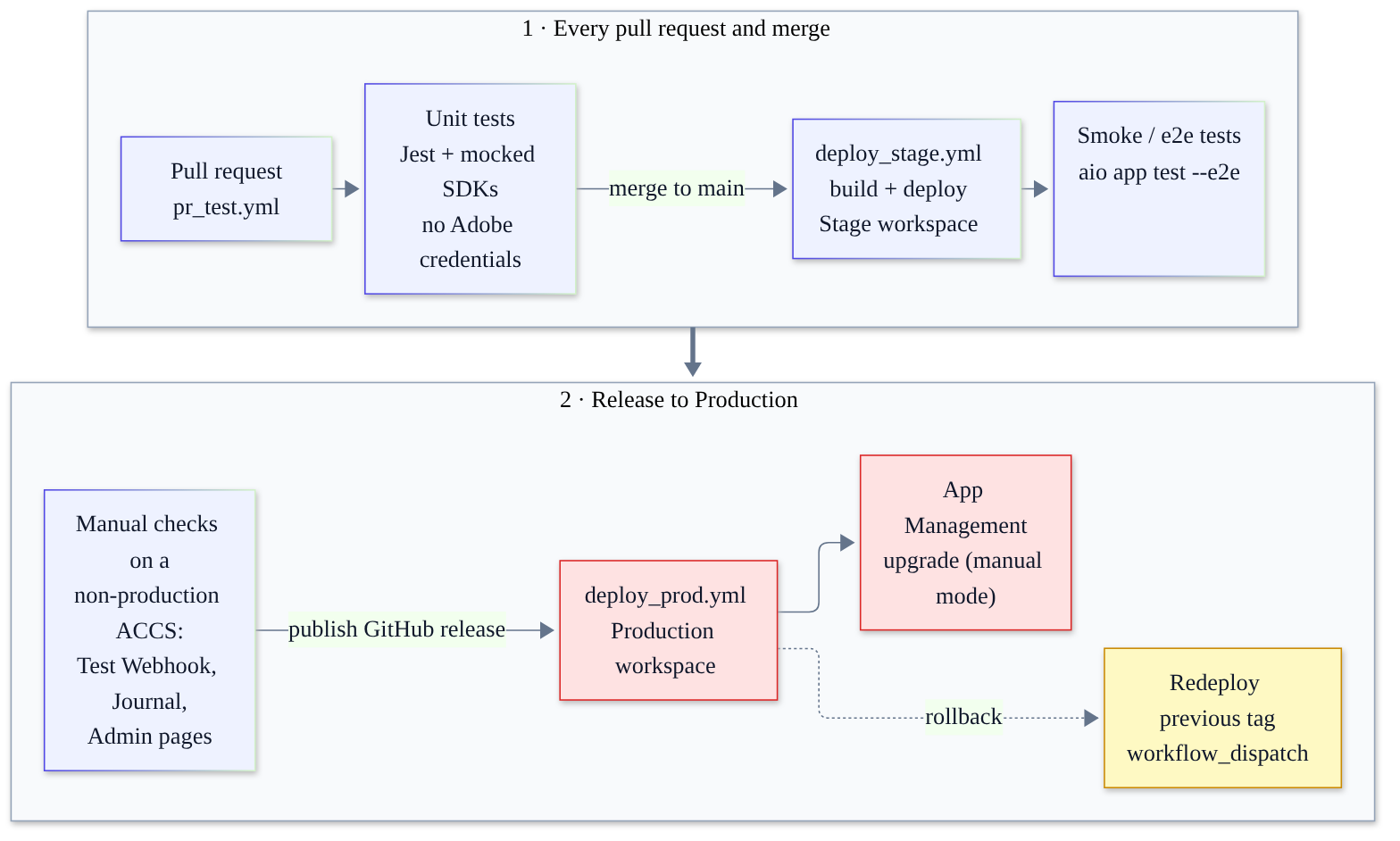
Short answer: App Builder CI/CD on ACCS means Jest unit tests with mocked SDKs on every pull request, a GitHub Actions deploy to a Stage workspace for real webhook and event tests, and a Production deploy triggered by a published GitHub release. Adobe documents no rollback command, so keep the previous release tag ready to redeploy.
On PaaS, my safety net was boring and reliable. Unit tests in dev/tests, a staging environment that mirrored production, and a deploy script that ran setup:upgrade at 2 a.m. On ACCS that whole stack is gone, because your custom code no longer lives inside Commerce. It lives in App Builder, and App Builder CI/CD is how you stop that code from breaking checkout on a Friday evening.
The good news: aio app init already scaffolds Jest tests and three GitHub Actions workflows. The catch is that they’re a starting point. They pin Node 20, need secrets that fork PRs can’t see, and say nothing about webhooks, events or the Admin UI SDK.
This is the guide I wish I’d had on my first ACCS project: what to test, where each test runs, how Stage-to-Production works, and how to roll back. I checked it against Adobe’s docs as they read in November 2026, and I flag anything Adobe doesn’t document.
If you haven’t built an App Builder app for ACCS yet, start with my first-extension walkthrough and come back.
Why App Builder CI/CD matters more on ACCS
In ACCS vs PaaS custom modules I explained why you can’t deploy PHP to ACCS. Every customisation becomes an out-of-process extension: a webhook action, an event consumer, an API Mesh source or an Admin UI SDK page. That changes what can break.
- Your code fails at runtime, not at deploy. There’s no
di:compileto catch a typo. A bad action deploys happily and then returns 500s to Commerce. - Webhooks sit in the request path. A synchronous webhook that throws can block an add-to-cart or an order placement. I compared both models in ACCS webhooks vs events.
- Workspaces are your environments. An App Builder project ships with Stage and Production workspaces, and each one is isolated. Your pipeline decides what reaches which one.
So the pipeline has two jobs: catch logic bugs before deploy, and make sure nobody runs aio app deploy from a laptop pointed at the wrong workspace. I’ve seen that happen.
The testing layers, and where each one runs
Here’s how I split testing for an ACCS app. Watch the last column: it tells you what needs credentials.
| Test type | Tooling | Where it runs | Needs Adobe credentials? |
|---|---|---|---|
| Unit tests | Jest, mocked @adobe/aio-sdk | Laptop and every PR | No |
| Contract tests with payload fixtures | Jest plus JSON fixtures | Laptop and every PR | No |
| Local simulation | aio app dev | Laptop | No for plain actions. State and Files libs won’t work |
| Deployed dev loop | aio app run | Your own workspace | Yes |
| Smoke and e2e tests | aio app test --e2e | CI, after Stage deploy | Yes |
| Webhook dry run | Admin Test Webhook page | Non-production ACCS instance | Admin access |
| Event replay | I/O Events Journaling API | Stage workspace | Yes |
| Admin UI SDK pages | App Management install | Non-production ACCS instance | Admin access |
The top two rows should catch most of your bugs. They’re fast, and they run without a single secret.
Unit tests: what aio app init gives you
A fresh project already has Jest wired up. The generated package.json includes jest as a dev dependency and two scripts:
"scripts": {
  "test": "jest --passWithNoTests ./test",
  "e2e": "jest --collectCoverage=false --testRegex ./e2e"
}
aio app test runs the unit tests by default. Add --e2e for end-to-end tests, --all for both, or --action <name> to target a single action. Each generated action also gets a test file that mocks @adobe/aio-sdk with jest.mock(), which is the pattern I build on below.
Here’s the command loop I use day to day:
# one-time setup
aio login
aio app init my-accs-app        # pick org, project and your workspace
cd my-accs-app
aio app add ci                  # only if .github/workflows is missing

# fast feedback, no network
npm test
aio app test --action validate-address

# run locally
aio app dev                     # local simulator, debuggable, hot reload
aio app run                     # deploys actions to the workspace, serves UI locally

# switch workspace (merge, don't overwrite your .env)
aio app use ~/Downloads/MyProject-Stage.json --merge
aio where

# manual deploy and post-deploy checks
aio app deploy
aio app test --e2e
aio app logs --limit 5
aio app dev runs actions in a local Node process, so breakpoints work. But Adobe’s docs say the State and Files libraries fail under aio app dev, because they only accept calls from inside Runtime. For those actions, use mocks or aio app run, which really deploys to your workspace.
A real unit test: webhook signature verification
Let’s test something that matters. This action handles a synchronous Commerce webhook that validates an Indian PIN code on address save. It verifies the webhook signature first, following Adobe’s signature verification guide.
Two details from that guide shape the code. The action needs the raw-http: true annotation, which makes Runtime pass the body as a base64 string in __ow_body. And the signature in x-adobe-commerce-webhook-signature is checked against that raw body with the public key from the Commerce Admin.
// actions/validate-address/index.js
const crypto = require('crypto')
const { Core } = require('@adobe/aio-sdk')

function isSignatureValid (params) {
  const signature = params.__ow_headers?.['x-adobe-commerce-webhook-signature']
  if (!signature || !params.__ow_body || !params.PUBLIC_KEY) return false
  const verifier = crypto.createVerify('SHA256')
  verifier.update(params.__ow_body) // raw-http: __ow_body arrives base64 encoded
  return verifier.verify(params.PUBLIC_KEY, signature, 'base64')
}

async function main (params) {
  const logger = Core.Logger('validate-address', { level: params.LOG_LEVEL || 'info' })
  if (!isSignatureValid(params)) {
    logger.warn('Rejected webhook call: missing or invalid signature')
    return { statusCode: 200, body: JSON.stringify([{ op: 'exception', message: 'Invalid signature' }]) }
  }
  const payload = JSON.parse(Buffer.from(params.__ow_body, 'base64').toString('utf8'))
  const postcode = String(payload?.address?.postcode || '')
  const operations = /^\d{6}$/.test(postcode)
    ? [{ op: 'success' }]
    : [{ op: 'exception', message: 'Please enter a valid 6-digit PIN code' }]
  return { statusCode: 200, body: JSON.stringify(operations) }
}

module.exports = { main, isSignatureValid }
The testing trick: never use the real Commerce key. Generate a throwaway RSA key pair in the test, sign a fixture with the private half, and pass the public half as PUBLIC_KEY. Now you can test the good path, a wrong key and a missing header with no network calls.
// test/validate-address.test.js
jest.mock('@adobe/aio-sdk', () => ({
  Core: { Logger: jest.fn(() => ({ info: jest.fn(), warn: jest.fn(), error: jest.fn(), debug: jest.fn() })) }
}))

const crypto = require('crypto')
const { main } = require('../actions/validate-address/index.js')
const fixture = require('./fixtures/address-save.json')

// A throwaway key pair, generated on every run. Never commit the real Commerce key.
const newKeys = () => crypto.generateKeyPairSync('rsa', {
  modulusLength: 2048,
  publicKeyEncoding: { type: 'spki', format: 'pem' },
  privateKeyEncoding: { type: 'pkcs8', format: 'pem' }
})
const { privateKey, publicKey } = newKeys()

// Build params the way Runtime hands them to a raw-http action
function signedParams (payload, signingKey = privateKey) {
  const body = Buffer.from(JSON.stringify(payload)).toString('base64')
  const signature = crypto.createSign('SHA256').update(body).sign(signingKey, 'base64')
  return {
    __ow_body: body,
    __ow_headers: { 'x-adobe-commerce-webhook-signature': signature },
    PUBLIC_KEY: publicKey
  }
}
const ops = (res) => JSON.parse(res.body)

describe('validate-address webhook', () => {
  test('returns success for a valid PIN code and a good signature', async () => {
    expect(ops(await main(signedParams(fixture)))).toEqual([{ op: 'success' }])
  })

  test('returns an exception for a bad PIN code', async () => {
    const bad = { address: { ...fixture.address, postcode: '41100A' } }
    expect(ops(await main(signedParams(bad)))[0]).toMatchObject({ op: 'exception' })
  })

  test('rejects a payload signed with someone else\'s key', async () => {
    const res = await main(signedParams(fixture, newKeys().privateKey))
    expect(ops(res)).toEqual([{ op: 'exception', message: 'Invalid signature' }])
  })

  test('rejects a call with no signature header', async () => {
    const params = signedParams(fixture)
    delete params.__ow_headers['x-adobe-commerce-webhook-signature']
    expect(ops(await main(params))[0].op).toBe('exception')
  })
})
I ran both test files in this post on Node 24 with Jest 29, and all six tests pass. One small oddity: Adobe’s page describes the signature as “HMAC SHA256”, but its own sample verifies it with an RSA public key via crypto.createVerify. I followed the sample, because that’s what the code actually does.
Payload fixtures: capture once, commit scrubbed
Don’t invent the fixture’s shape. The payload depends on the fields configured on the hook, so capture one real request on Stage, strip anything personal, and commit it to test/fixtures/. If someone changes the hook’s fields, the fixture should change in the same PR.
Mocking the SDKs: an events consumer with State and the Journal
For anything that talks to Adobe services (aio-lib-state, aio-lib-files, aio-lib-events or the openwhisk client), mock at the @adobe/aio-sdk boundary and assert on the calls.
This action reads events from the I/O Events Journaling API and saves a cursor in State. It’s adapted from Adobe’s journaling tutorial, trimmed so the test is readable.
// actions/journal-consumer/index.js
const { Core, State, Events } = require('@adobe/aio-sdk')
const { getAccessToken } = require('../auth')

const CURSOR_KEY = 'last_journal_position'

async function main (params) {
  const logger = Core.Logger('journal-consumer', { level: params.LOG_LEVEL || 'info' })
  const state = await State.init()
  const token = await getAccessToken(params)
  const events = await Events.init(params.IMS_ORG_ID, params.API_KEY, token)

  const cursor = await state.get(CURSOR_KEY)
  const options = cursor ? { since: cursor.value } : {}
  const journal = await events.getEventsFromJournal(params.JOURNAL_URL, options)
  const batch = journal.events || []

  for (const entry of batch) {
    logger.info(`Processing ${entry.event.type} ${entry.event.id}`)
    // real work goes here: push to ERP, update a PIM, etc.
  }
  if (batch.length) {
    await state.put(CURSOR_KEY, batch[batch.length - 1].position)
  }
  return { statusCode: 200, body: { processed: batch.length } }
}

module.exports = { main }
// test/journal-consumer.test.js
jest.mock('@adobe/aio-sdk', () => ({
Core: { Logger: jest.fn(() => ({ info: jest.fn(), error: jest.fn() })) },
State: { init: jest.fn() },
Events: { init: jest.fn() }
}))
jest.mock('../actions/auth', () => ({ getAccessToken: jest.fn().mockResolvedValue('fake-token') }))
const { State, Events } = require('@adobe/aio-sdk')
const { main } = require('../actions/journal-consumer/index.js')
const mockState = { get: jest.fn(), put: jest.fn() }
const mockEvents = { getEventsFromJournal: jest.fn() }
const params = { IMS_ORG_ID: 'fake-org@AdobeOrg', API_KEY: 'fake-key', JOURNAL_URL: 'https://example.invalid/journal' }
beforeEach(() => {
jest.clearAllMocks()
State.init.mockResolvedValue(mockState)
Events.init.mockResolvedValue(mockEvents)
})
test('resumes from the saved cursor and stores the newest position', async () => {
mockState.get.mockResolvedValue({ value: 'pos-41' })
mockEvents.getEventsFromJournal.mockResolvedValue({
events: [
{ position: 'pos-42', event: { id: 'e1', type: 'com.adobe.commerce.observer.catalog_product_save_commit_after' } },
{ position: 'pos-43', event: { id: 'e2', type: 'com.adobe.commerce.observer.catalog_product_save_commit_after' } }
]
})
const res = await main(params)
expect(mockEvents.getEventsFromJournal).toHaveBeenCalledWith(params.JOURNAL_URL, { since: 'pos-41' })
expect(mockState.put).toHaveBeenCalledWith('last_journal_position', 'pos-43')
expect(res.body.processed).toBe(2)
})
test('does not move the cursor when the journal is empty', async () => {
mockState.get.mockResolvedValue(undefined)
mockEvents.getEventsFromJournal.mockResolvedValue({ events: [] })
await main(params)
expect(mockEvents.getEventsFromJournal).toHaveBeenCalledWith(params.JOURNAL_URL, {})
expect(mockState.put).not.toHaveBeenCalled()
})getAccessToken is my own small IMS wrapper, in its own file so it’s easy to mock. The second test matters most: a consumer that moves its cursor too early quietly loses events.
Testing webhooks and events against a real ACCS instance
Unit tests prove your logic, not that Commerce and your action agree on the contract. For that you need a deployed Stage action and a non-production ACCS instance. Whether you have one depends on your contract, so check first.
Webhooks. ACCS has a built-in dry run. In the Admin’s webhook list, open a hook’s Select > Test Webhook, paste a request payload, and click Run Webhook. Commerce shows whether execution succeeded and the resolved payload after your operations are applied. Adobe’s testing webhooks page marks this as SaaS-only. The webhooks:dev:run CLI command is for PaaS, so it isn’t available to you on ACCS.
Events. Adobe’s events guide says you can’t debug web actions against ACCS or a deployed instance. You simulate locally with aio app dev and post a sample CloudEvents payload. After that, the Journal is your replay tool. The Journaling docs say it keeps up to seven days of events, lets you iterate from any earlier event in that window, and keeps storing events when push delivery fails. So: fix the bug, deploy to Stage, reset your cursor, reprocess.
Admin UI SDK. Adobe’s Admin configuration and testing page says local testing is PaaS-only and V1-only, and that on ACCS you must leave Enable local testing set to No. Adobe doesn’t document a dedicated test flow for V2 on ACCS. My approach is to unit test the React components with Jest, deploy to Stage, install the app on a non-production ACCS instance through App Management, and turn on Database logging so the Admin UI SDK Logs screen shows what went wrong.
The GitHub Actions workflows Adobe generates
Adobe’s CI/CD with GitHub Actions guide describes three workflow files in .github/workflows:
pr_test.ymlruns on every pull request. It builds the app and runsaio app test.deploy_stage.ymldeploys to the Stage workspace on every push tomain.deploy_prod.ymldeploys to Production when you publish a GitHub release.
They use two Adobe actions. adobe/aio-cli-setup-action installs the CLI. adobe/aio-apps-action runs build, test, deploy and oauth_sts, which gets an IMS token from an OAuth Server-to-Server credential. The current templates pin aio-cli-setup-action@1.3.0 with CLI 11.x.x, and aio-apps-action@4.1.0.
Secrets are scoped through GitHub environments named stage and production, with the same names in each. Older guides used _PROD suffixes, so check which convention a copied workflow expects.
My Stage workflow
This is the generated deploy_stage.yml with my usual changes: Node 24, npm ci, unit tests before deploy, a custom secret for the webhook public key, and a smoke test after.
# .github/workflows/deploy_stage.yml
name: Deploy to Stage

on:
  push:
    branches: [main]

concurrency:
  group: deploy-stage
  cancel-in-progress: false

jobs:
  deploy:
    name: Test, build and deploy to Stage
    runs-on: ubuntu-latest
    environment: stage
    steps:
      - name: Checkout
        uses: actions/checkout@v4
      - name: Use Node.js 24
        uses: actions/setup-node@v4
        with:
          node-version: '24'
          cache: npm
      - name: Install
        run: npm ci
      - name: Unit tests (gate the deploy)
        run: npm test
      - name: Setup CLI
        uses: adobe/aio-cli-setup-action@1.3.0
        with:
          os: ubuntu-latest
          version: 11.x.x
      - name: Auth
        uses: adobe/aio-apps-action@4.1.0
        with:
          os: ubuntu-latest
          command: oauth_sts
          CLIENTID: ${{ secrets.CLIENTID }}
          CLIENTSECRET: ${{ secrets.CLIENTSECRET }}
          TECHNICALACCOUNTID: ${{ secrets.TECHNICALACCID }}
          TECHNICALACCOUNTEMAIL: ${{ secrets.TECHNICALACCEMAIL }}
          IMSORGID: ${{ secrets.IMSORGID }}
          SCOPES: ${{ secrets.SCOPES }}
      - name: Build
        env:
          AIO_RUNTIME_NAMESPACE: ${{ secrets.AIO_RUNTIME_NAMESPACE }}
        uses: adobe/aio-apps-action@4.1.0
        with:
          os: ubuntu-latest
          command: build
      - name: Deploy
        env:
          AIO_RUNTIME_NAMESPACE: ${{ secrets.AIO_RUNTIME_NAMESPACE }}
          AIO_RUNTIME_AUTH: ${{ secrets.AIO_RUNTIME_AUTH }}
          AIO_PROJECT_ID: ${{ secrets.AIO_PROJECT_ID }}
          AIO_PROJECT_NAME: ${{ secrets.AIO_PROJECT_NAME }}
          AIO_PROJECT_ORG_ID: ${{ secrets.AIO_PROJECT_ORG_ID }}
          AIO_PROJECT_WORKSPACE_ID: ${{ secrets.AIO_PROJECT_WORKSPACE_ID }}
          AIO_PROJECT_WORKSPACE_NAME: ${{ secrets.AIO_PROJECT_WORKSPACE_NAME }}
          AIO_PROJECT_WORKSPACE_DETAILS_SERVICES: ${{ secrets.AIO_PROJECT_WORKSPACE_DETAILS_SERVICES }}
          PUBLIC_KEY: ${{ secrets.COMMERCE_WEBHOOK_PUBLIC_KEY }}
        uses: adobe/aio-apps-action@4.1.0
        with:
          os: ubuntu-latest
          command: deploy
          noPublish: true
      - name: Smoke test the deployed actions
        env:
          AIO_RUNTIME_NAMESPACE: ${{ secrets.AIO_RUNTIME_NAMESPACE }}
        run: npm run e2e
noPublish: true matches Adobe’s Stage template. Putting a custom secret under the Deploy step’s env is Adobe’s documented method, the CI equivalent of a .env line. The generated e2e stub builds the action URL from runtime.namespace, which the CLI reads from AIO_RUNTIME_NAMESPACE.
For pr_test.yml I run only npm ci and npm test, with no Adobe secrets. The template builds with Stage credentials, and GitHub doesn’t pass secrets to pull requests from forks. A credential-free PR job works for everyone and can’t leak anything.
OAuth Server-to-Server credentials and the secrets checklist
Each workspace needs the I/O Management API added in Developer Console. That attaches an OAuth Server-to-Server credential with the scopes needed to deploy. Then download the workspace JSON, run aio app use <file> --merge, and run Adobe’s fetch-secrets.sh script from the guide to print every value. JWT credentials are deprecated, so don’t start a new pipeline on them.
Your local .env stays local. Here’s the shape, with placeholders only:
# .env  (local only, listed in .gitignore; aio app use writes the AIO_ lines)
AIO_RUNTIME_NAMESPACE=<org-id>-<project>-stage
AIO_RUNTIME_AUTH=<runtime-auth-placeholder>
LOG_LEVEL=debug
PUBLIC_KEY="-----BEGIN PUBLIC KEY-----
<paste the key from the Stage ACCS Admin: Stores > Settings > Configuration > Adobe Services > Webhooks>
-----END PUBLIC KEY-----"
And this is the checklist I tick off for each GitHub environment:
Secret (same name in stage and production) | Where the value comes from | Used by |
|---|---|---|
CLIENTID, CLIENTSECRET | OAuth Server-to-Server credential | Auth step |
TECHNICALACCID, TECHNICALACCEMAIL | Same credential | Auth step |
IMSORGID, SCOPES | Same credential | Auth step |
AIO_RUNTIME_NAMESPACE, AIO_RUNTIME_AUTH | Workspace Runtime namespace | Build and Deploy |
AIO_PROJECT_ID, AIO_PROJECT_NAME, AIO_PROJECT_ORG_ID | Developer Console project | Deploy |
AIO_PROJECT_WORKSPACE_ID, AIO_PROJECT_WORKSPACE_NAME | Workspace | Deploy |
AIO_PROJECT_WORKSPACE_DETAILS_SERVICES | Workspace services JSON | Deploy |
COMMERCE_WEBHOOK_PUBLIC_KEY (custom) | That environment’s ACCS Admin | Deploy step env |
That’s 14 Adobe secrets per environment, plus your own. Different ACCS instances have different webhook key pairs, so the public key has to be per environment too.
Adobe’s credential rotation guide uses aio runtime action update, and any parameter you leave out of that call is dropped. With CI in place, I’d rather update the GitHub secret and redeploy.
Promotion: Stage to Production, App Management and rollback
Production deploys start when you publish a GitHub release. deploy_prod.yml listens for release: types: [released], so drafts and pre-releases don’t trigger it.
On ACCS, a deploy is half the story. If your app uses App Management, Adobe’s upgrade docs treat an App Builder deployment and an App Management upgrade as separate operations. After you deploy a new version, App Management is told an upgrade is available. In the default manual mode, an admin reviews the plan and starts it. The auto mode is marked experimental. Two rules from those docs belong in your release process:
- Bump
metadata.versioninapp.commerce.configwhenever webhooks, events or Admin UI registrations change. - New Runtime code can receive traffic before the admin runs the upgrade. Keep it compatible with the old contract during that window.
Adobe’s App Management build docs deploy with aio app deploy --force-deploy --no-build. The CLI help says --force-deploy deploys “regardless of production Workspace being published in Exchange”, and aio-apps-action exposes a matching forceDeploy input. If your Production workspace is published as an Exchange app and the prod job refuses to deploy, that flag is the reason. For private distribution, an org admin reviews the submission in Developer Console. Public apps go through Adobe review on Exchange.
Rollback: redeploy a previous tag
Adobe doesn’t document a rollback command for App Builder, and I found no versioned deployments to flip back to. So rollback means “deploy the last good tag again”. I add a manual trigger to deploy_prod.yml:
on:
  release:
    types: [released]
  workflow_dispatch:
    inputs:
      ref:
        description: 'Tag to redeploy (rollback), e.g. v1.4.2'
        required: true

# ...and in the job:
      - name: Checkout
        uses: actions/checkout@v4
        with:
          ref: ${{ inputs.ref || github.ref }}
Re-running the old release’s workflow run also works, because a re-run uses the original commit. One caution I can’t back with docs: if the bad release changed app.commerce.config, rolling back code doesn’t undo what App Management applied. Then I ship a fix-forward release with a higher version. Deploys from CLI v11 or later also appear in the Developer Console project activity logs, which helps when you need to know who deployed what.
Which Node version?
The docs don’t agree with each other, so here’s the full picture:
- The generated workflows still pin Node 20.
- App Management’s build docs say the CLI requires Node 22 to 24, and its generated actions default to the
nodejs:24runtime. - I/O Runtime supports the three latest Node.js versions, and its runtime list currently includes 24.
- Adobe’s Commerce checkout starter kit declares
"node": "^24.0.0".
My call: Node 24 everywhere: .nvmrc, the setup-node step and runtime: nodejs:24 in app.config.yaml. Then tests run on the version you deploy.
Gotchas I’ve hit (or nearly hit)
- CLI v11 needs IMS auth to deploy. The standalone example in the
aio-apps-actionREADME has no Auth step. With CLI v11, deploying and undeploying need Adobe IMS authentication, so keep theoauth_stsstep. aio app usewithout--mergecan overwrite your.env. Adobe’s guide asks you to merge for a reason.- State and Files don’t work in
aio app dev. Your journal consumer will fail locally, even though it works when deployed. - ACCS can’t reach your laptop. Point webhooks at a deployed Stage action, not at a tunnel. Never disable SSL verification or destination validation outside a throwaway setup.
- Regenerating the webhook key pair breaks verification right away. Update the GitHub secret and redeploy in the same change window.
- Webhook response caching. If a hook has a
ttl, you may be testing a cached response rather than your new code.
Go-live checklist
- ☐ Unit tests cover the signature check, each webhook operation and the event handlers.
- ☐ Fixtures are captured from real Stage payloads and scrubbed.
- ☐ PR workflow runs without Adobe secrets.
- ☐
stageandproductionGitHub environments exist, each with its own secrets and a required reviewer onproduction. - ☐ I/O Management API added to both workspaces.
- ☐ Node 24 in
.nvmrc, CI andapp.config.yaml. - ☐
package-lock.jsoncommitted andnpm ciused in CI. - ☐ Stage deploy runs e2e smoke tests.
- ☐ Webhooks dry-run with Test Webhook on a non-production ACCS instance.
- ☐ Journal replay tested once, with a cursor reset.
- ☐
metadata.versionbumped and the upgrade mode chosen on purpose. - ☐ Rollback rehearsed: redeploy the previous tag to Stage and time it.
If you’re still moving from PaaS, the PaaS to ACCS migration checklist covers what comes before any of this.
FAQ
aio app test run e2e tests by default?No. With no flags, it runs unit tests only. Use --e2e for end-to-end tests or --all for both.
Yes. Adobe has a custom CI/CD guide for other tools. The steps are the same: install the CLI, authenticate with the OAuth Server-to-Server credential, then build and deploy.
It’s optional, but I like it. Adobe’s deployment guide says you can add workspaces beyond Stage and Production, including one per developer. That keeps aio app run experiments out of Stage.
No. You enable it under Stores > Settings > Configuration > Adobe Services > Webhooks and generate a key pair. Do it on every environment, and test the “invalid signature” path as well as the happy path.
Wrapping up
It’s the PaaS discipline you already have (tests, staging, tagged releases, a rollback plan) mapped onto App Builder workspaces. What’s new is where the risk sits: in the runtime contracts between Commerce and your actions. Test those hardest.
New to the series? Start with the introduction to ACCS. And if your pipeline does something smarter than mine, especially around rollback with App Management, tell me in the comments. I’ll update this post.
More in the ACCS series
This is part 11 of 11 in my ACCS series. Previous: Admin UI SDK in ACCS: custom Admin pages without PHP. It’s the latest part, so if you’re starting out, go back to the beginning with the introduction to ACCS. The full series list is in the introduction.